

If you are an administrator of a blog, you can manage the users and roles directly from the blog dashboard.
Adding an existing user to a blog
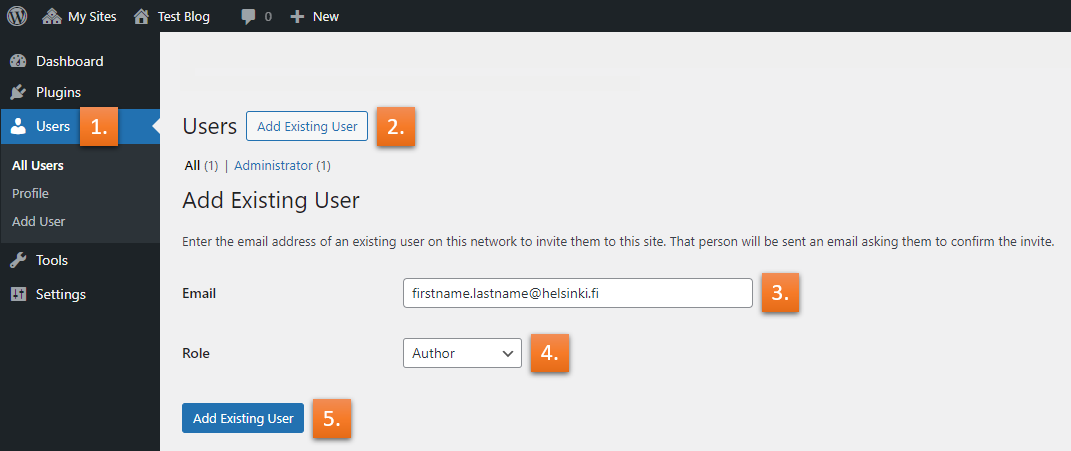
- When logged in to the blog dashboard; from left, select Users -> All Users.
- Now, you should see a screen with the possibility to Add Existing User to your blog, so go ahead and click that.
- After this, you should see an Add Existing User – field, where you can fill in the users information.
(Important notice: Before a user can be added to a blog as an existing user, they have to log in at least once to the blog service at /wp-admin. Otherwise, the addition of the user is not possible). - Next, select a desired role for the user (roles briefly explained in the bottom of this page)
- Lastly click the blue Add Existing User – button at the bottom. The addition of the user should be completed, after they’ve accepted the confirmation from their e-mail.
Roles briefly explained
Administrator
The highest level of permission. Admins have the power to access almost everything within a blog site.
Editor
Has access to all posts, pages, comments, categories, and tags on a blog site and can upload media.
Author
Can write, upload media, edit, and publish their own posts.
Contributor
Has no publishing or uploading capability but can write and edit their own posts until they are published by someone with higher privileges.
Subscriber
Users who subscribe to your site’s updates.